📧 Create a Gmail Account (Step by Step)
Step 1: Open Gmail Sign-Up Page
Go to: https://accounts.google.com/signup
👉 Click: Create account
Urdu:
➡️ ویب سائٹ کھولیں اور Gmail Create account پر کلک کریں
🧾 Step 2: Fill the Sign-Up Form
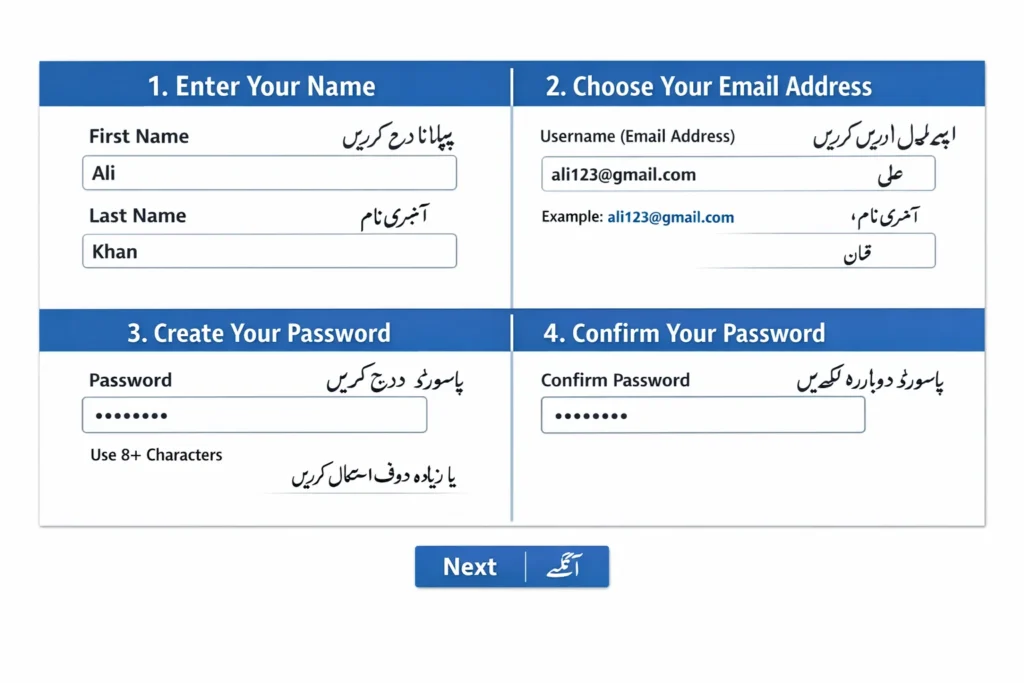
1. First Name & Last Name
- First Name: Your name
- Last Name: Your family name
Example:
- First Name: Ali
- Last Name: Khan
Urdu:
- First Name: پہلا نام
- Last Name: آخری نام
2. Username (Email Address)
This will be your email address.
Example:
⚠️ If already taken, try different numbers.
Urdu:
➡️ یہ آپ کا ای میل ایڈریس ہوگا
➡️ اگر نام پہلے سے موجود ہو تو نیا نام یا نمبر شامل کریں
3. Password
- Use strong password (8+ characters)
- Mix letters, numbers, symbols
Example:
Ali@12345
Urdu:
➡️ مضبوط پاسورڈ رکھیں
➡️ حروف، نمبر اور علامات شامل کریں
4. Confirm Password
Re-type the same password
Urdu:
➡️ پاسورڈ دوبارہ لکھیں
👉 Click: Next
Urdu:
➡️ Next پر کلک کریں
📱 Step 3: Phone Number Verification
- Enter your mobile number
- You will receive a code (OTP)
Urdu:
➡️ اپنا موبائل نمبر لکھیں
➡️ آپ کو کوڈ (OTP) موصول ہوگا
👉 Enter the code and click Verify
Urdu:
➡️ کوڈ لکھ کر Verify پر کلک کریں
📅 Step 4: Personal Information
1. Recovery Email (Optional)
- You can skip this
Urdu:
➡️ ریکوری ای میل (اختیاری ہے)
2. Date of Birth
- Day / Month / Year
Urdu:
➡️ تاریخ پیدائش درج کریں
3. Gender
- Male / Female / Rather not say
Urdu:
➡️ جنس منتخب کریں
👉 Click: Next
Urdu:
➡️ Next پر کلک کریں
📜 Step 5: Agree to Terms
- Scroll down
- Click: I Agree
Urdu:
➡️ نیچے جائیں اور I Agree پر کلک کریں
✅ Done! Your Gmail is Created 🎉
Now you can use your email like:
- Send emails
- Use YouTube
- Use Google Drive
Urdu:
➡️ آپ کا جی میل اکاؤنٹ بن گیا ہے
➡️ اب آپ ای میل، یوٹیوب اور دیگر سروسز استعمال کر سکتے ہیں
🧠 Tips (Important)
✔ Always remember your password
✔ Add recovery email/phone
✔ Don’t share your password
Urdu:
✔ اپنا پاسورڈ یاد رکھیں
✔ ریکوری ای میل یا نمبر شامل کریں
✔ پاسورڈ کسی کے ساتھ شیئر نہ کریں